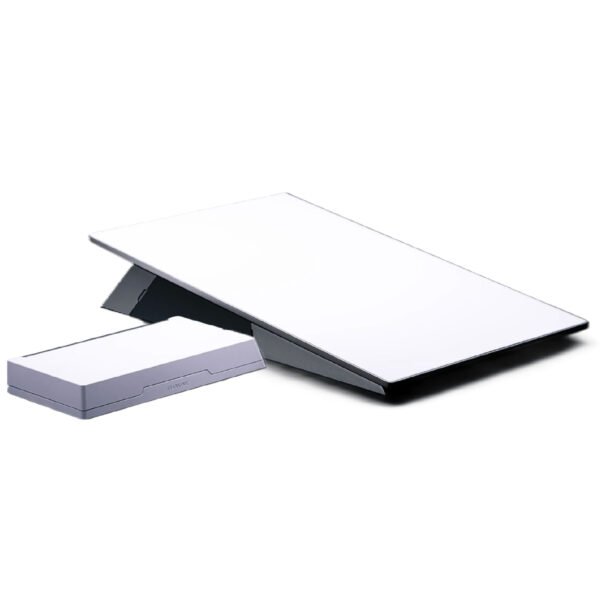
The landscape of satellite internet is evolving rapidly, and at its forefront is Starlink, continually pushing boundaries. For those living beyond the reach of traditional broadband, or seeking robust, reliable connectivity wherever they roam, the arrival of Starlink Gen 3 promises a significant leap forward. Forget what you thought you knew about satellite internet; this isn't your parents' slow, laggy connection. We're diving deep into the Starlink Gen 3 Performance & Technical Specifications, revealing what makes this latest iteration a game-changer for residential users and demanding applications alike.
Starlink Gen 3: At a Glance
Curious about the key upgrades? Here’s a quick rundown of what makes the Starlink Gen 3 kit stand out:
- Sleeker, Lighter Dish: The new Starlink dish is significantly lighter and boasts a wider 110° field of view for enhanced satellite acquisition.
- Built for Extremes: Designed to withstand operational wind speeds exceeding 96 kph (60 mph) and featuring advanced snow melt capabilities up to 40 mm (1.5 in) per hour.
- Next-Gen Connectivity: The included Gen 3 Wi-Fi Router features Wi-Fi 6 (802.11ax) with Tri-Band 4x4 MU-MIMO radio for superior speed and device handling.
- Expanded Reach: The router offers an impressive coverage area of up to 297 m² (3,200 ft²) and can connect up to 235 devices simultaneously.
- Wired Connections Return: Two (2) latching Ethernet LAN ports are now standard on the Gen 3 router, making wired connections straightforward.
- Robust Mesh System: Compatible with both Gen 2 and Gen 3 Starlink Mesh Nodes, allowing for seamless network expansion up to three nodes.
- Residential Powerhouse: Optimized for everyday internet applications like high-definition streaming, smooth video calls, and responsive online gaming.
The Next Generation Arrives: What's New with Starlink Gen 3?
Starlink has consistently aimed to deliver high-speed, low-latency internet to the most remote corners of the globe. With each generation, the technology advances, becoming more efficient, robust, and user-friendly. The Gen 3 system, often referred to as the "Standard" kit on Starlink's official specifications, is precisely engineered for residential users, providing a powerhouse of connectivity for typical household demands. This means you can confidently stream your favorite shows in 4K, engage in crystal-clear video conferences, or dive into online gaming without the frustrating lag that once plagued satellite services.
What truly sets Gen 3 apart is a combination of design refinements and technological enhancements that collectively elevate the user experience. From a more compact dish to a significantly upgraded router, every component has been fine-tuned. For a deeper dive into the system's evolution, you might want to Explore Starlink Generation 3 and see how it fits into the broader Starlink ecosystem.
The Dish Reimagined: Starlink Gen 3 Antenna Specifications
The Starlink dish, often affectionately called "Dishy," is the iconic centerpiece of your system. For Gen 3, this crucial component has received a thoughtful overhaul, focusing on improved performance, durability, and a more streamlined profile.
Antenna Type and Field of View
At its core, the Gen 3 Starlink antenna employs an Electronic Phased Array. This sophisticated technology allows the dish to electronically steer its signal to track multiple satellites simultaneously without any moving parts. This is critical for maintaining a stable, high-speed connection as satellites whiz overhead.
Perhaps the most significant performance upgrade here is the expanded Field of View (FoV), now a generous 110°. A wider field of view means the dish can "see" more satellites in the sky at any given moment, leading to fewer obstructions, more consistent connections, and potentially improved latency. This broader perspective is a key factor in boosting reliability, especially in areas with scattered trees or partial line-of-sight challenges.
Streamlined Setup with Software-Assisted Orientation
Gone are the days of the dish automatically motorizing into its optimal position in certain configurations. The Gen 3 dish utilizes Software Assisted Manual Orienting. While still leveraging smart algorithms to identify the best orientation, it often allows for a more direct, user-controlled initial setup, simplifying the installation process for many. You'll still want to choose a clear line of sight, of course, and for tips on optimizing your Starlink installation, be sure to consult official guides and community resources.
Physical Design: Lighter, More Resilient
The Gen 3 dish is noticeably more compact and lighter than its predecessors, making it easier to handle and install. It weighs in at a lean 2.9 kg (6.4 lb), or 3.2 kg (7 lb) with the included Kickstand. This reduction in weight doesn't compromise on durability, however.
Its Environmental Rating is a robust IP67 Type 4. What does this mean for you?
- IP67: This signifies complete protection against dust ingress and protection against immersion in water up to 1 meter for 30 minutes. Your dish is safe from heavy rain, snow, and dusty conditions.
- Type 4: This NEMA rating indicates the enclosure is suitable for indoor or outdoor use, providing a degree of protection against ingress of water (rain, snow, sleet, splashing water, and hose-directed water) and windblown dust, and protection against the formation of external ice on the enclosure.
In essence, Starlink Gen 3 is built tough, ready to face the elements head-on without faltering.
Extreme Weather Resilience: Keeping You Connected
Weather can be a major disruptor for traditional satellite systems, but Starlink Gen 3 is engineered to minimize downtime.
- Operating Temperature: It operates flawlessly in a wide range of temperatures, from a frigid -30°C to 50°C (-22°F to 122°F). Whether you're in an Alaskan winter or an Arizona summer, your Starlink should keep working.
- Wind Speed: The dish is designed to remain operational in significant winds, capable of handling 96 kph+ (60 mph+) gusts. This means less worry during severe weather events.
- Snow Melt Capability: Heavy snowfall can be a problem, but Gen 3 features active heating with a Snow Melt Capability of up to 40 mm / hour (1.5 in / hour). This ensures snow and ice don't accumulate on the dish, preventing signal obstruction and maintaining connectivity.
Power Profile: Efficient Operation
Despite its enhanced capabilities, the Gen 3 dish maintains reasonable power consumption. It typically draws an Average of 75 - 100 W. This makes it an efficient option for continuous operation, though it's still a factor to consider for off-grid setups or when pairing with solar power solutions.
Connectivity Powerhouse: The Starlink Gen 3 Wi-Fi Router
While the dish pulls the internet from space, it's the router that brings that connection into your home. The Starlink Gen 3 Wi-Fi Router is a significant upgrade, designed to deliver a modern, high-performance wireless experience.
Modern Wi-Fi Standards: Speed and Efficiency
The Gen 3 router fully embraces Wi-Fi 6 (802.11ax) technology. This isn't just a number; it translates to:
- Faster Speeds: More efficient data transfer, especially when multiple devices are connected.
- Improved Performance in Congested Environments: Better handling of numerous devices vying for bandwidth.
- Better Battery Life for Devices: More efficient communication with client devices.
It features a Tri-Band 4x4 MU-MIMO radio. - Tri-Band: This refers to the router operating on three distinct Wi-Fi frequency bands (typically one 2.4 GHz band and two 5 GHz bands, or even a 6 GHz band with Wi-Fi 6E, though the spec here simply states Tri-Band). This allows for more dedicated bandwidth and reduced interference.
- 4x4 MU-MIMO: Multiple User, Multiple Input, Multiple Output technology allows the router to communicate with multiple devices simultaneously rather than sequentially. This dramatically improves efficiency and throughput when you have many devices connected at once.
To truly understand what this means for your daily browsing and streaming, it helps to grasp the benefits of Wi-Fi 6 technology in a home network.
Physical Features: Designed for Your Home
The Gen 3 router boasts a sleek, upright design with Product Dimensions of 43.4 x 298.6 x 120.4 mm (1.7 in x 11.76 in x 4.74 in) and a weight of 0.57 kg (1.25 lbs). It's designed to fit discreetly into your living space.
A long-requested feature by many users, the Gen 3 router finally includes Two (2) Latching Ethernet LAN ports with removable covers. This is fantastic news for anyone who prefers a wired connection for their gaming console, desktop PC, or smart TV, ensuring the lowest latency and most stable connection possible without needing an extra Ethernet adapter.
A subtle LED Power Indicator is located on the face plate, in the lower left corner of the router, providing a quick visual cue of its operational status.
Unrivaled Coverage & Capacity: Connect Everything
This router isn't just fast; it's expansive. It offers Wi-Fi Coverage of up to 297 m² (3,200 ft²). This is a substantial area, suitable for most medium to large homes, minimizing dead spots.
Furthermore, the router can Connect up to 235 devices. In today's smart homes filled with phones, tablets, laptops, smart speakers, security cameras, and more, this immense capacity ensures all your gadgets can connect without bogging down your network.
Seamless Network Expansion: Mesh Compatibility
For larger homes or properties with unique layouts that might still have Wi-Fi dead zones, the Gen 3 router supports a robust mesh network. It's Compatible with Starlink Gen 2 and Gen 3 Mesh nodes, allowing you to extend your Wi-Fi coverage effortlessly. You can connect up to 3 Starlink Mesh Nodes to create a unified, high-performance network throughout your entire property.
Important Note: The Starlink Gen 3 router is Not compatible with 3rd party mesh systems. You'll need to use official Starlink mesh nodes for seamless expansion.
Security and Durability
The router secures your network with WPA2 encryption, a widely recognized and robust security standard.
While configured for indoor use, the router meets an IP56 (Water Resistant) Environmental Rating. This offers a degree of protection against dust and splashing water, meaning it can handle typical indoor spills or humidity without immediate failure. Its Operating Temperature range is -30°C to 50°C (-22°F to 122°F), matching the dish for resilience in diverse indoor climates.
Want to learn more about this crucial component? Consider delving deeper into router features to optimize your home network.
The Heart of the System: Starlink Gen 3 Power Supply Details
Often overlooked, the power supply is a vital component ensuring your Starlink system gets the clean, consistent power it needs to perform. The Gen 3 power supply is designed with both efficiency and durability in mind.
Compact & Robust
The power supply comes in a manageable size, with Product Dimensions of 173 x 93 x 35.75 mm (6.8 in x 3.66 in x 1.4 in) and weighing 0.65 kg (1.43 lbs). It's compact enough to be placed discreetly near your router.
Similar to other components, it boasts a strong Environmental Rating of IP66 Type 4.
- IP66: Indicates complete protection against dust and protection against powerful water jets from any direction.
- Type 4: Reinforces its suitability for various conditions, offering protection against hose-directed water and windblown dust, and protection against external ice.
This robust rating ensures the power supply can withstand more challenging environments if its placement requires it, though it's typically housed indoors.
Reliable Performance
The power supply is designed for broad compatibility, accepting Power Specifications of 100-240V ~ 2.5A 50 - 60 Hz. This means it can be used with standard electrical outlets globally without needing additional converters (though a prong adapter might be required for different outlet types).
Its Operating Temperature range is -30°C to 60°C (-22°F to 140°F), slightly broader than the dish and router, reflecting its role as a stable power source even in more varied conditions.
What's in Your Starlink Gen 3 Kit?
Opening your Starlink Kit is straightforward, as it arrives with everything you need to get online in minutes. Here's a precise breakdown of what you'll find in the box:
- Starlink: This is your Gen 3 dish, ready to connect to the satellites.
- Kickstand: A simple, sturdy base that allows for immediate ground-level deployment of your Starlink dish. It's perfect for testing or temporary setups.
- Gen 3 Router: The upgraded Wi-Fi 6 router, ready to blanket your home in high-speed internet.
- Starlink Cable: A generous 15 m (49.2 ft) cable to connect your dish to the power supply and router, providing ample length for optimal dish placement.
- AC Cable: A 1.5 m (4.92 ft) cable for connecting the power supply to your wall outlet.
- Power Supply: The dedicated power unit for the Starlink system.
Real-World Performance: What Starlink Gen 3 Means for You
Starlink positions its Gen 3 kit as "Best for residential users and everyday internet applications." This isn't just marketing speak; it's a commitment to delivering a consistently high-quality experience for common online activities.
Target Applications: From Entertainment to Productivity
With the Gen 3 system, you can expect seamless performance for:
- Streaming: Enjoy 4K HDR content on multiple devices without buffering. The enhanced Wi-Fi 6 router and improved dish capabilities work together to deliver robust throughput.
- Video Calls: Participate in important work meetings or connect with family and friends through platforms like Zoom, Google Meet, or Microsoft Teams with clear audio and video, thanks to lower latency and consistent bandwidth.
- Online Gaming: Experience responsive gameplay with reduced lag. While satellite internet will always have slightly higher latency than fiber, Starlink's low-Earth orbit constellation and improved Gen 3 hardware make it a viable and often superior option for competitive online gaming compared to traditional satellite or even some DSL connections.
While specific peak throughput numbers for the Gen 3 kit aren't listed directly in the core specifications, its design points to a system optimized for stable, high-bandwidth delivery for these applications. The focus is on providing a consistent, reliable experience rather than simply hitting theoretical maximums. To make sure you're getting the most out of your connection, it's worth selecting the right Starlink service plan that matches your usage needs.
Beyond the Box: Mounts and Future-Proofing
While the included kickstand is great for initial setup, for a permanent, obstruction-free installation, you'll likely need additional mounting hardware. Starlink acknowledges this, stating that "Mounts designed to permanently install your Starlink to avoid obstructions will be available for purchase on the Starlink Shop once your Starlink is ordered."
Proper placement is paramount for optimal performance. You'll want an unobstructed view of the sky, free from trees, buildings, or other tall structures. This is where specialized mounts – like pole mounts, wall mounts, or ridge-line mounts – become invaluable. Investing in the right mounting solution ensures your dish maintains that crucial 110° field of view, maximizing its connection stability and speed. For comprehensive advice on exploring compatible Starlink accessories, check the official Starlink store.
Starlink Gen 3 vs. The World: A Quick Perspective
The Starlink Gen 3 system isn't just an incremental update; it’s a direct response to evolving internet usage patterns and a continued effort to make satellite internet truly competitive. Compared to older Starlink hardware, Gen 3 brings meaningful upgrades in router capabilities (Wi-Fi 6, Ethernet ports, mesh expansion) and dish resilience (wider FoV, lighter design).
For rural users who have long been subjected to slow, unreliable DSL or prohibitively expensive fixed wireless, Starlink Gen 3 offers a compelling alternative. It bridges the digital divide, providing access speeds and reliability previously unimaginable in many remote areas. Even when considering how Starlink stacks up against traditional fiber internet, its unique benefits for mobility and remote access shine, offering a flexible solution where wired infrastructure simply isn't feasible.
Frequently Asked Questions About Starlink Gen 3
Let's address some common questions you might have about this exciting new hardware.
Is Starlink Gen 3 available now?
The official Starlink specifications page notes "Stay tuned for release updates about this product." While the Gen 3 kit is actively rolling out in various regions, availability can vary by location. It's best to check the Starlink website directly for current order availability in your specific service area.
Can I use my old Gen 2 mesh nodes with the Gen 3 router?
Yes, the Gen 3 router is designed with backward compatibility in mind. It is "Compatible with Starlink Gen 2 and Gen 3 Mesh nodes," allowing you to seamlessly integrate existing Gen 2 mesh extenders into your new Gen 3 network. However, remember it's "Not compatible with 3rd party mesh systems."
What's the typical power consumption of the Gen 3 system?
The Starlink Gen 3 dish has an average power consumption of 75 - 100 W. This figure helps in planning for off-grid power solutions or simply understanding your household's energy footprint.
How durable is the Gen 3 Starlink dish and power supply?
Both the dish and power supply are built for extreme durability. The dish carries an IP67 Type 4 environmental rating, while the power supply is IP66 Type 4. These ratings indicate strong protection against dust, water ingress (including heavy rain and powerful jets), and resistance to wind and temperature extremes, ensuring long-term reliability in harsh outdoor conditions.
Does the Gen 3 router have Ethernet ports?
Yes! A key upgrade for the Gen 3 router is the inclusion of two (2) Latching Ethernet LAN ports with removable covers. This eliminates the need for a separate Ethernet adapter, making wired connections much simpler and more convenient.
Ready for the Future? Navigating Starlink Gen 3
The Starlink Gen 3 system represents a significant step forward in making high-performance satellite internet accessible and reliable for residential users. From its more robust and efficient dish to the feature-packed Wi-Fi 6 router with built-in Ethernet, this iteration addresses key user needs and leverages the latest in connectivity technology.
Whether you're looking to upgrade your existing Starlink setup or are considering satellite internet for the first time, understanding these technical specifications empowers you to make an informed decision. The Gen 3 kit is designed to provide a smooth, high-bandwidth experience, enabling everything from family movie nights to critical remote work, no matter how far off the beaten path you may be. Keep an eye on Starlink's official channels for the latest availability and get ready to experience connectivity redefined.